OpenAPI Import
Import an OpenAPI or Swagger spec as curl-runner YAML from the CLI or the studio. One file per operation, a .env with the variables, auth credentials kept out.
Feature overview →Turn an OpenAPI or Swagger document into curl-runner files. You get:
- One YAML file per operation, in a folder per tag.
- A
.envwith the API's base URL and its secret names. - A
README.mdwith the API's description, if it has one. - Sample values for every parameter and body, taken from the spec.
- A check on the documented success status, so the folder works as a smoke test from the start.
- A short list of what still needs your attention, such as a file to pick or a secret to set.
The importer never copies a credential from an auth scheme or a secret-named parameter into a file. Existing files are never overwritten: a name that is taken gets -2, -3 and so on.
curl-runner reads OpenAPI 3.0, OpenAPI 3.1 and Swagger 2.0, as JSON or YAML. It detects the format from the content, not the file name. It converts what it can read, so one odd operation doesn't block the rest.
From the CLI
curl-runner convert openapi pets.yamlConverted 6 requests in 3 folders to pets
Needs your attention:
- Pick a file for "file" in pets/Upload photo
- Set the secret PETS_API_KEY
Run them from pets so curl-runner loads its .env.
Set the secrets above in pets/.env.local.
A secret left unset is sent as written, like ${PETS_API_KEY}.The files go into a folder named after the API's info.title:
pets/
  .env
  README.md
  pets/
    create-pet.yaml
    get-pet.yaml
    list-pets.yaml
    upload-photo.yaml
  store/
    place-order.yaml
  users/
    get-user.yaml
Use -o to pick another folder. Here -o is a directory, not a file.
curl-runner convert openapi pets.yaml -o tests/apiEach file reads like one you wrote by hand:
# Imported from OpenAPI: Pets
# Everything about pets.

request:
  name: Create pet
  method: POST
  url: ${PETS_BASE_URL}/pets
  headers:
    X-API-Key: ${PETS_API_KEY}
    Content-Type: application/json
  body:
    id: 1
    name: Rex
    tag: string
  expect:
    status: 201
The .env holds the base URL. A secret is listed by name only, commented out. If the spec lists more servers, they show up as comments:
# Imported from OpenAPI: Pets
# Other server: https://staging.example.com/v1
PETS_BASE_URL=https://api.example.com/v1
# PETS_API_KEY is a secret: set it in .env.local
# PETS_API_KEY=
Set the secrets in .env.local, and keep that file out of git. The CLI never writes a secret's value.
Run the files from the output folder. That's where curl-runner finds .env.
cd pets
curl-runner pets/
The command exits with 0 even when something needs your attention. It exits with 1 only if the file can't be read, isn't an OpenAPI or Swagger document, or the files can't be written.
In the studio
Press ⌘I, or choose File › Import Requests…, then open the OpenAPI tab. Choose a .json, .yaml or .yml spec, or drop it on the dialog. A spec dropped on the Postman collection tab opens the OpenAPI tab too. The preview lists the request files you'll get and what needs your attention. Nothing is written yet.
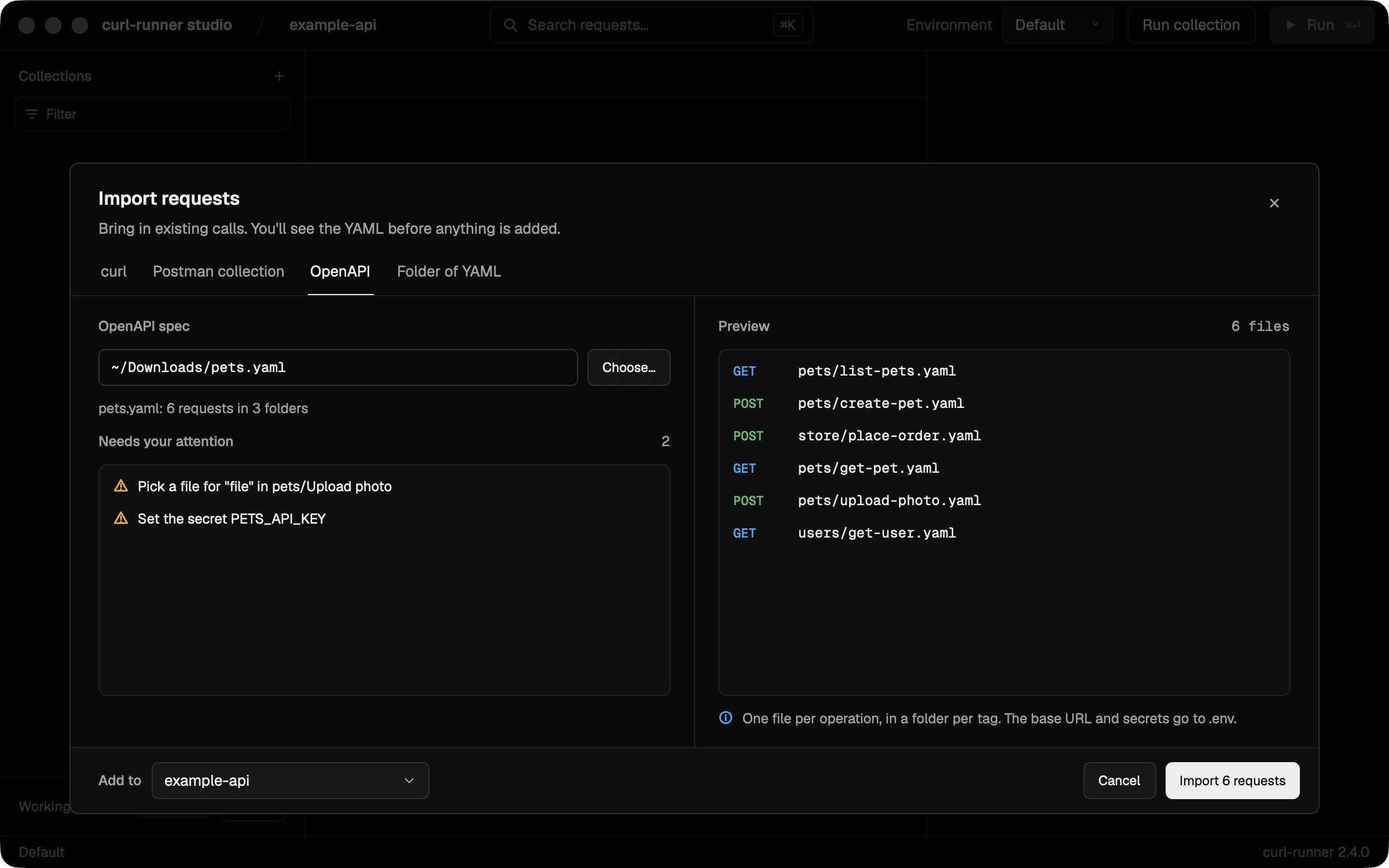
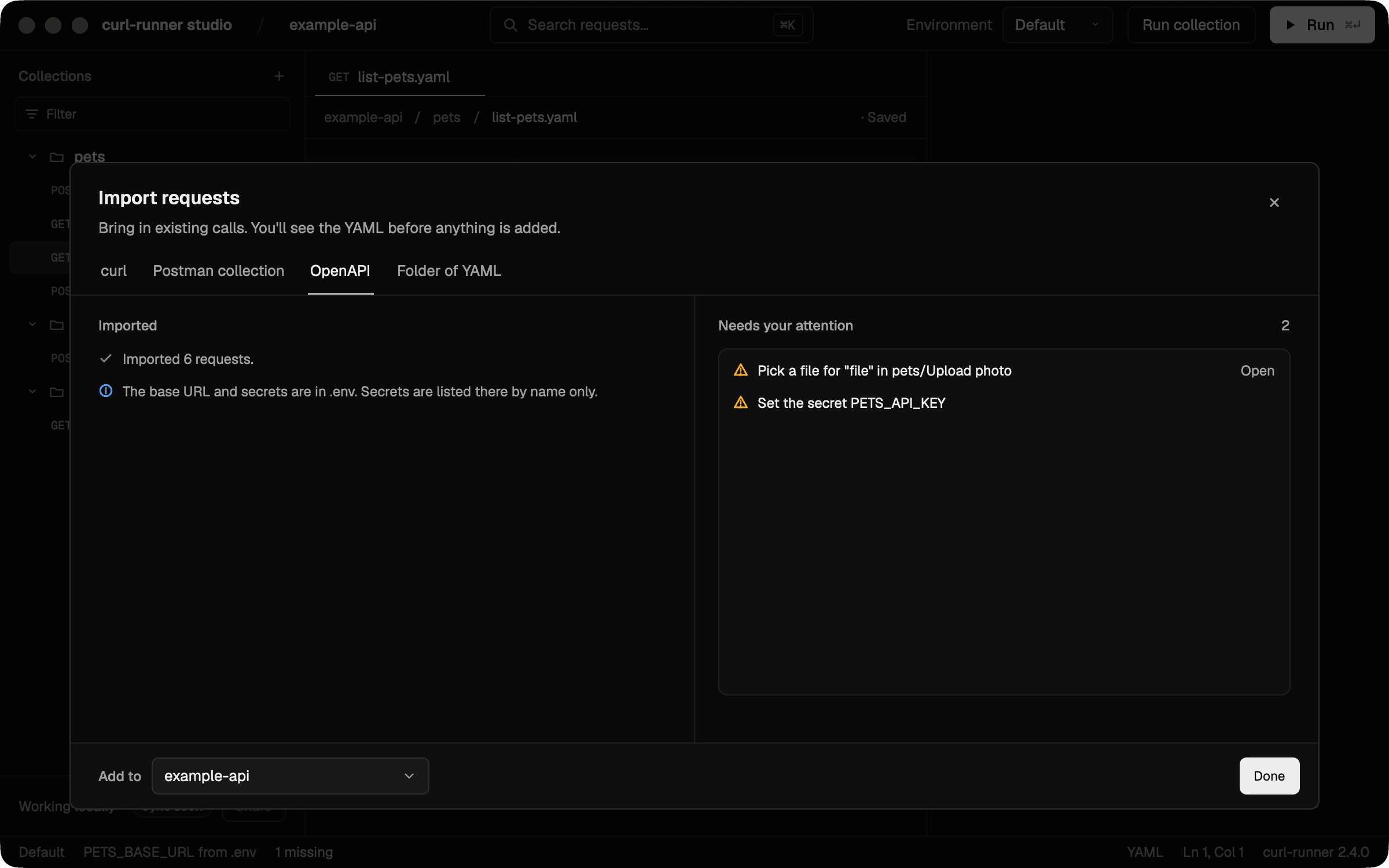
Choose Import to add the files to the folder in Add to. The base URL goes to the collection's .env, and each secret is listed there by name only. The importer never copies a secret's value, so the summary lists each secret for you to set in Environments, where the studio keeps it in the macOS Keychain.
After the import, the dialog lists what still needs your attention. Choose Open next to a "Pick a file" item to open that request and set the file.
What's converted
Folders and requests
- Each operation becomes a file, under the folder of its first tag. An operation is written once, even when it has several tags.
- An operation with no tag goes in a folder named after the first segment of its path that isn't a version (like
v1),apior a{template}. It goes in the root only when the path has no such segment. - The request name is the operation's
summary, else itsoperationId, elseGET /pets/{id}. File names are the lowercase slug of that name, likeCreate pet→create-pet.yaml. - The
description,operationId,externalDocslink and aDeprecatednote go in comments at the top of the file, then the tag's description. info.descriptionbecomesREADME.md, if there isn't one yet.- HTML tags in descriptions are stripped and basic entities are decoded.
Servers and the base URL
- The first server becomes
${<PREFIX>_BASE_URL}at the start of every URL. Its value goes to.env. - A server variable, like
{region}, is replaced with its default. One with no default is reported. - When the spec lists more servers, the others are comment lines in
.env. - A relative server URL, like
/v1, or no server at all leaves the variable with the relative part or empty. The report asks you to set it. - An operation or path item with its own server uses that server's URL as written, and the report says so.
- A user name or password in a server URL, like
https://user:pass@api.example.com, is removed. The report says so, without the values. - Line breaks and control characters are removed from server URLs.
Variable names
Every import writes into the one .env at the output root, and that file keeps the keys it already has. Variables are prefixed per API so two APIs can share one .env without sending requests to the wrong host.
The prefix comes from info.title. It's uppercased, anything other than letters, digits and _ becomes one _, and it's cut at a word boundary to at most 24 characters. An empty title gives API. For example, "Swagger Petstore - OpenAPI 3.0" gives SWAGGER_PETSTORE, so the base URL is SWAGGER_PETSTORE_BASE_URL.
Path parameters, like {petId}, aren't prefixed. They are per file and live in that file's global.variables, with a sample value. A path variable that no parameter declares gets string, and the report asks you to set it.
Parameters
- A required query or header parameter is an enabled entry with a sample value.
- An optional one is a commented-out line with a sample value and the parameter's description. Uncomment it to switch it on.
- An array query parameter has its items joined with
,. A required parameter that needsexplodeor anotherstyleis reported. Optional ones are commented out, so they aren't. - Required cookie parameters join into one
Cookieheader. Optional ones are left out and reported. - Header parameters named
Accept,Content-TypeandAuthorizationare skipped, as OpenAPI says. The body setsContent-Typeand security schemes set auth. A requiredAuthorizationparameter on a request with no auth is reported. - A
Cookieheader parameter joins the sameCookieheader, so a request sends one. - Parameters on a path item merge with the operation's. The operation wins on the same name and location.
Sample values
Each parameter and body gets a sample value. curl-runner picks the first one it finds:
- The
example, or the first of theexamples. - The schema's
example,default,constor firstenumvalue. - A generated value.
Generated values are fixed, so the same spec always gives the same files:
| Schema | Sample |
|---|---|
string | string |
integer or number | minimum if set, else 1 |
boolean | true |
date-time | 2024-01-01T00:00:00Z |
email | user@example.com |
uri | https://example.com |
| object | Every property, required or not |
| array | One item |
allOf | The parts merged |
oneOf or anyOf | The first option |
A recursive schema stops where it loops, so you never get an endless body. A very large schema gets a size cap on its optional properties.
Values keep their type: an integer is 1, not "1". A query or header value is written as text.
A value from the spec that holds ${, like ${HOME}, is kept as written. curl-runner fills it from your environment when it runs, so the report lists those requests. Check them.
Auth
An operation's security overrides the spec's. security: [] means no auth. When security lists alternatives, curl-runner uses the first one. Only one auth block is filled, so a second bearer, basic or OAuth scheme in the same requirement is skipped and reported. API key schemes all apply, since they are headers, params or cookies. The report says which alternative it used and which others the operation accepts.
| Scheme | curl-runner |
|---|---|
| API key in a header | A header with the scheme's name and ${VAR} |
| API key in a query | A query param |
| API key in a cookie | Added to the Cookie header |
| HTTP bearer | An auth block of type bearer |
| HTTP basic | An auth block of type basic, with a username and a password variable |
| OAuth 2.0 or OpenID Connect | An auth block of type bearer. Put an access token in the variable |
| Other HTTP schemes, like digest | No auth, and the report lists it |
The variable is the API prefix plus the scheme's key from components.securitySchemes, uppercased, plus a suffix:
| Scheme | Variable |
|---|---|
| API key, OAuth 2.0, OpenID Connect | <PREFIX>_<SCHEME>, like PETS_API_KEY |
| HTTP bearer | <PREFIX>_<SCHEME>_TOKEN |
| HTTP basic | <PREFIX>_<SCHEME>_USERNAME and <PREFIX>_<SCHEME>_PASSWORD |
Every auth variable is a secret, except the basic username. A secret is listed in .env as a commented # NAME= line, and you set the value in .env.local. The username is a plain variable, and the report asks you to set it.
A literal credential in a parameter's example, such as an API key or token, is scrubbed and becomes a secret variable too. When the spec also has an apiKey scheme with the same name, both share one variable. A path parameter is scrubbed only when the spec gives it a value and its name is exactly a secret parameter name, like token or api_key. A generated sample is never treated as a secret.
Bodies
When a request body lists several media types, curl-runner prefers JSON, then multipart/form-data, then application/x-www-form-urlencoded, then text and XML. Anything else, like application/octet-stream, is reported and left out.
- JSON: a
bodybuilt from the sample value, plus aContent-Typeheader. - multipart: each top-level property becomes a form field. A binary field points at
./pick-a-file, and the report asks you to pick one. Optional fields come in commented out. There's noContent-Typeheader, because curl sets the boundary. - form-urlencoded: a form string with the required properties, plus a
Content-Typeheader. Optional properties are listed by name in a comment above the body. - No schema properties: a form schema that is explicitly empty means no body, and isn't reported.
- text and XML: the
exampleas a string, or an empty one, plus aContent-Typeheader. XML isn't generated from schemas.
Expected status
Each request gets expect.status set to the lowest documented 2xx response. 2XX becomes 200. With no 2xx, only default, or no responses, there's no expect block.
Swagger 2.0
A Swagger 2.0 document is read as if it were OpenAPI 3. host, basePath and schemes become the server, in: body becomes the request body, in: formData becomes a form body, and securityDefinitions become security schemes. The body gets every media type in consumes, so the preference under Bodies picks one. A form with a file is always multipart.
The report
An issue that repeats across operations is one item, with a count and up to three example requests. A large spec doesn't get a line per operation. Each item names what it's about:
- Pick a file for "…": a form field needs a file. It points at
./pick-a-fileuntil you change it. This one stays one item per field. - Set the secret …: set the secret's value in
.env.local. - Set the variable …: set a plain value in
.env. It shows up for a relative or missing base URL, and for a basic auth username. - Put an … access token in …: an OAuth 2.0 or OpenID Connect scheme became a bearer token you supply.
- Used … in N requests that also accept …: an operation offered several auth alternatives, and the first one was used. It reads Sent no auth in … when the first alternative is no auth.
- Skipped … auth (…) in N requests: that scheme isn't supported. Add it by hand.
- Couldn't resolve … or Can't follow the external reference …: a
$refpoints nowhere or outside the document. The schema behind it was treated as empty. - Skipped … bodies in N requests: that media type isn't supported.
- N requests use their own server …: an operation or path item has its own
servers. - The server variable … has no default: edit the URLs that use it.
- N parameters use a style curl-runner doesn't model: check their values.
- Left out optional cookies in N requests: optional cookie parameters aren't written.
- Used the first of several body shapes in N requests: the body schema had
oneOforanyOfat its top level. - Skipped N webhooks, callbacks or links: they're counted, not converted.
- Renamed the variable … to …: the name changed so curl-runner can use it.
- Kept the value of … already in .env:
.envalready had the variable with another value, so the import left it. - Skipped …: …: a path item or operation couldn't be read, like one that isn't an object or a
$refthat can't be followed. The rest still converts. - Skipped N parameters with no name or an unknown location: a parameter has no
name, or aninother than path, query, header or cookie. - Left out the Authorization header parameter in N requests: a required
Authorizationheader parameter on a request whose auth doesn't set that header. That's a request with no auth, or one whose API key goes in a query parameter or cookie. OpenAPI sends auth through security schemes. Add it by hand if the API needs it. - Kept
${…}from the API description in N requests: a spec value holds${. curl-runner fills it from your environment when it runs. Check it. - Gave undeclared path variables a sample value in N requests: the path has a
{template}no parameter declares. Set the right values. - Removed a user name or password from a server URL: add the credentials as auth if the API needs them. The report never shows them.
- Made … one line in .env: the value held a control character, like a form feed, or a Unicode line separator. Either would break its
.envline, so every control character and line break was removed from the value, newlines and tabs included. A value whose only special characters are newlines, carriage returns or tabs is kept whole: they're written escaped, as\n,\rand\t.
What's skipped
These show up in the report:
- External
$refs, to another file or a URL. - Webhooks, callbacks and links.
- Auth schemes other than API key, bearer, basic, OAuth 2.0 and OpenID Connect.
- Body types other than JSON, multipart, form-urlencoded, text and XML, such as a binary file.
These are skipped without a report item, since every spec has them:
- Response body checks. Only the status is asserted.
- Running OAuth 2.0 or OpenID Connect flows. The report asks for an access token instead.
x-extensions.
Limits
- The CLI takes a local file. To import a spec from a URL, download it first with
curl -o openapi.json <url>. - The document isn't validated. A spec that breaks the OpenAPI rules still converts, as far as it can be read.
- Sample values are a starting point. Change them to records that exist in your API.
- A secret inside a body's
exampleis kept as written. Replace it with a variable by hand.
Postman Import
Import a Postman collection as curl-runner YAML, from the CLI or the studio. You get one file per request, a .env with the variables, and no secrets in files.
Environment Files & Secret Redaction
Load variables from .env files in curl-runner, with environment-specific overrides, a clear precedence order and automatic secret redaction in output.