Postman Import
Import a Postman collection as curl-runner YAML, from the CLI or the studio. You get one file per request, a .env with the variables, and no secrets in files.
Feature overview →Turn a Postman collection into curl-runner files. You get:
- One YAML file per request, in a folder per Postman folder.
- A
.envwith the collection's variables. - A
README.mdwith the collection's description, if it has one. - A short list of what still needs your attention, such as a file to pick or a secret to set.
Secret values never land in a file. Existing files are never overwritten: a name that is taken gets -2, -3 and so on.
Export the collection from Postman as Collection v2.1 first. Then import it from the CLI or from the studio.
From the CLI
curl-runner convert postman example-api.postman_collection.jsonConverted 5 requests in 2 folders to example-api
Needs your attention:
- Pick a file for "document" in Documents/Convert document
- Set the secret apiKey
- Set the secret PASSWORD
Run them from example-api so curl-runner loads its .env.
Set the secrets above in example-api/.env.local.
A secret left unset is sent as written, like ${apiKey}.The files go into a folder named after the collection:
example-api/
  .env
  README.md
  customers/
    create-customer.yaml
    delete-customer.yaml
    list-customers.yaml
  documents/
    convert-document.yaml
    health.yaml
Use -o to pick another folder. Here -o is a directory, not a file.
curl-runner convert postman example-api.postman_collection.json -o tests/apiEach file reads like one you wrote by hand:
# Imported from Postman: Example API
# Lists customers, newest first.

request:
  name: List customers
  method: GET
  url: ${baseUrl}/v1/customers
  headers:
    X-Api-Key: ${apiKey}
  params:
    limit: "10"
    # starting_after: cus_1
The .env holds the plain variables. A secret is listed by name only, commented out:
# Imported from Postman: Example API
baseUrl=https://api.example.com
# apiKey is a secret: set it in .env.local
# apiKey=
# PASSWORD is a secret: set it in .env.local
# PASSWORD=
Set the secrets in .env.local, and keep that file out of git. The CLI never writes a secret's value, so it lists every secret, even one that had a value in Postman.
Run the files from the output folder. That's where curl-runner finds .env.
cd example-api
curl-runner customers/
The command exits with 0 even when something needs your attention. It exits with 1 only if the file can't be read, isn't a v2.0 or v2.1 collection, or the files can't be written.
In the studio
Press ⌘I, or choose File › Import Requests…, then open the Postman collection tab. Choose the collection's .json file, or drop it on the dialog. The preview lists the request files you'll get and what needs your attention. Nothing is written yet.
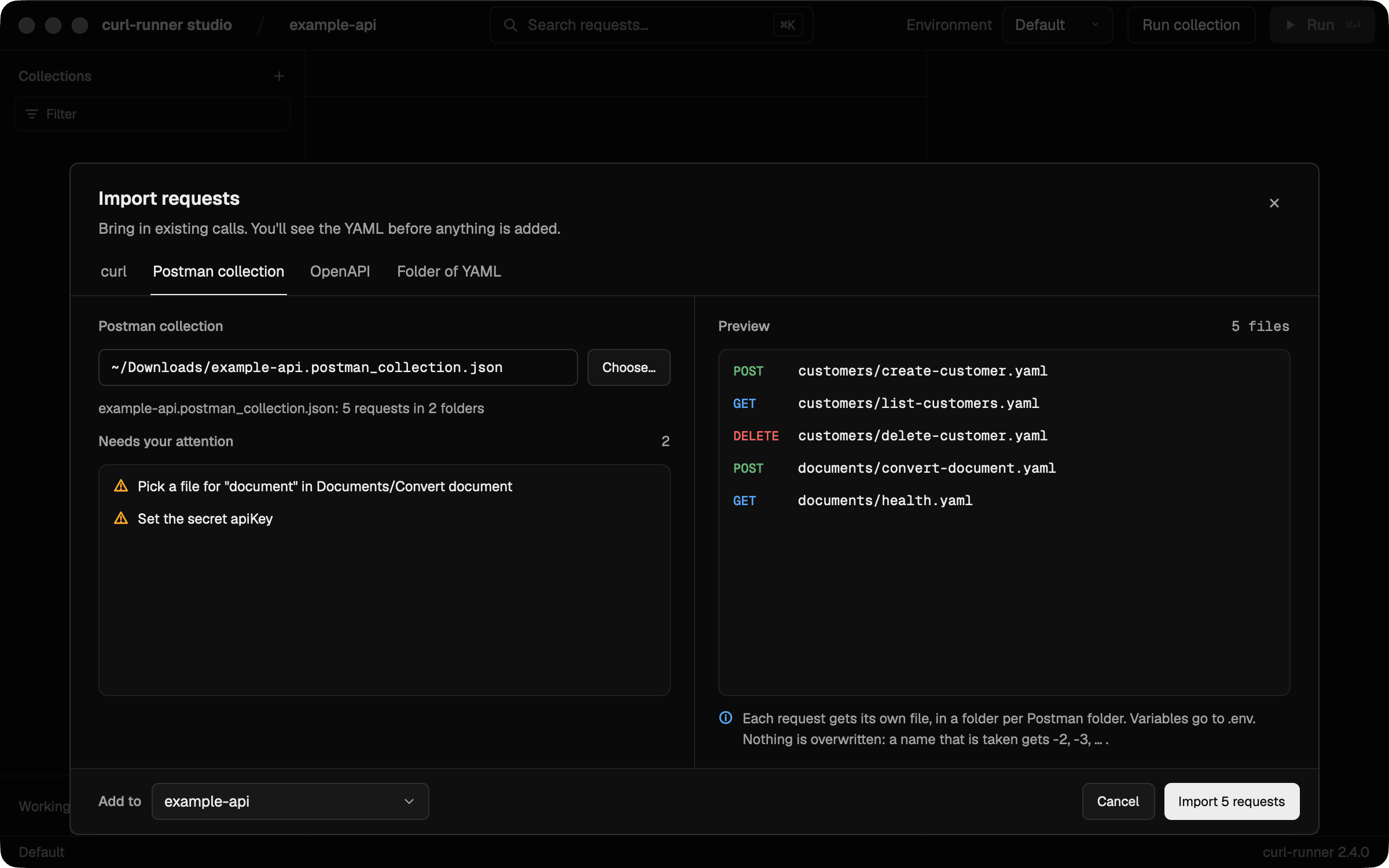
Choose Import to add the files to the folder in Add to:
- The collection's variables go to the collection's
.env. - Secret values go to the macOS Keychain, never into a file. Clear Save the secret values to the Keychain to set them yourself later in Environments.
- If the Keychain already holds a different value for a secret, the studio keeps that value and lists the secret for you to set.
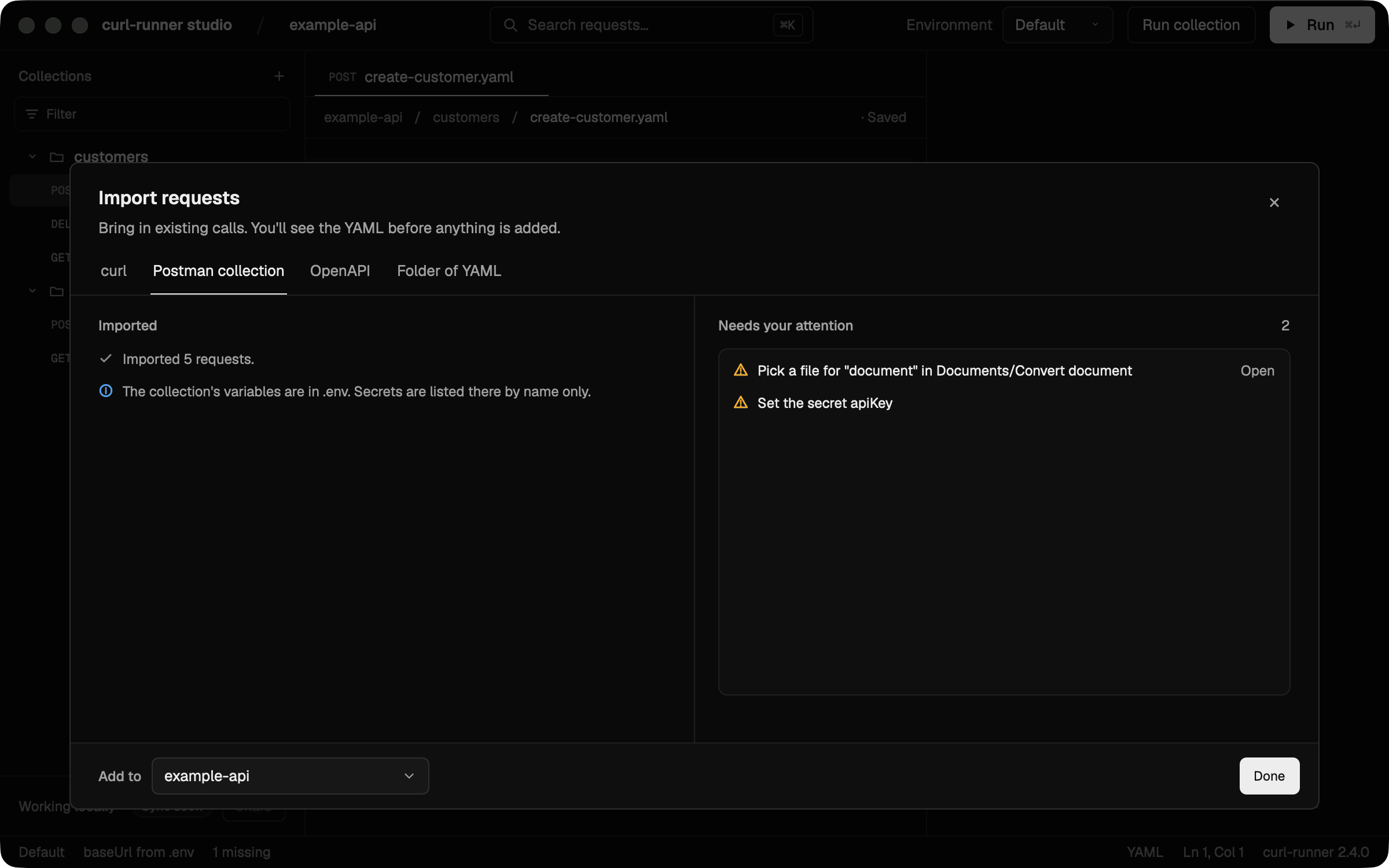
After the import, the dialog lists what still needs your attention. Choose Open next to a "Pick a file" item to open that request and set the file.
What's converted
Folders and requests
- Each Postman folder becomes a folder, and each request a file. Names become lowercase file names, like
Create customer→create-customer.yaml. - Methods, URLs, query params and headers come across as they are. A request with no method is a
GET.
Variables
- Collection variables become
${name}and go to.env. - A name curl-runner can't use is renamed, and the report says so. Characters other than letters, digits and
_become_. A name that clashes with a curl-runner dynamic variable, such asUUIDorTIMESTAMP, gets_VARat the end. - A variable a request uses but the collection doesn't define is listed for you to set.
- Path variables, like
:idin/customers/:id, become${id}. Their values go into the file'sglobal.variables.
Auth
- Basic and bearer auth become an
authblock. - API key auth becomes a header or a query param, wherever Postman sends it.
- A request with no auth of its own uses its folder's auth, then the parent folder's, then the collection's.
inheritworks the same way. noauthstops that: the request is sent without auth.- A credential written out in Postman moves to a secret variable, like
${API_TOKEN},${API_USER}and${API_PASSWORD}. A credential that already uses a variable makes that variable a secret.
Literal secrets in headers and query params move to variables too. That covers headers such as Authorization, and any name ending in -Key or _Key. For params, it covers names like token, api_key, password and signature.
Bodies
- A raw JSON body becomes YAML. Other raw bodies stay as text. If you picked a language in Postman, such as XML or text, the matching
Content-Typeis set. - A GraphQL body becomes a JSON body with
queryandvariables. - A urlencoded body becomes a form string, with its
Content-Type. - A form-data body becomes
formData. A file field with no file in the export points at./pick-a-file, and the report asks you to pick one. A field with several files keeps the first.
Disabled fields and descriptions
- A header, param or form field that is turned off in Postman comes in commented out. Uncomment it to switch it on.
- A disabled urlencoded field becomes a comment.
- Request and folder descriptions become comments at the top of the file. A field's description becomes a comment above that field.
Dynamic variables
| Postman | curl-runner |
|---|---|
{{$guid}} | ${UUID} |
{{$randomUUID}} | ${UUID} |
{{$randomInt}} | ${RANDOM:0-1000} |
Every other dynamic variable stays as written, and the report lists it. That includes {{$timestamp}}: it counts seconds, and curl-runner's ${TIMESTAMP} counts milliseconds.
The report
Each item names the request, folder or variable it's about:
- Pick a file for "…": a form field needs a file the export didn't include. The file points at
./pick-a-fileuntil you change it. - Kept the first of N files: a form field held several files. Add the others by hand.
- Set the secret …: set the secret's value in
.env.local(CLI) or in Environments (studio). - Set the variable …: a request uses a variable the collection doesn't define.
- Renamed the variable … to …: the name changed so curl-runner can use it.
- Skipped the variable …: two variables end up with the same name. The first one wins.
- Skipped a script: a pre-request or test script isn't translated.
- Skipped … auth: that auth type isn't supported. Add it by hand.
- Skipped a … body: that body type isn't supported.
- Kept
{{$…}}: a dynamic variable with no curl-runner match. - Skipped saved examples: Postman's saved responses aren't imported.
- Kept the value of … already in .env:
.envalready had the variable with another value, so the import left it.
What's skipped
- Pre-request and test scripts.
- Auth types other than basic, bearer and API key, such as OAuth 2.0 or Digest.
- Body types other than raw, GraphQL, urlencoded and form data, such as a binary file.
- Saved examples.
- Dynamic variables other than the three above.
Each one shows up in the report with the request it came from.
Limits
- Only Postman collections, v2.0 and v2.1. OpenAPI import isn't available yet.
- Postman environment files aren't imported. Copy their values into
.envor.env.localyourself. - Scripts aren't translated. Rewrite their checks as
expectblocks. - A secret inside a raw JSON body is kept as written. Replace it with a variable by hand.
Curl ⇄ YAML Conversion
Convert curl commands to curl-runner YAML and back. Paste a curl command, get clean YAML. Convert YAML specs to canonical curl commands.
Environment Files & Secret Redaction
Load variables from .env files in curl-runner, with environment-specific overrides, a clear precedence order and automatic secret redaction in output.