curl-runner 2.5.0 imports OpenAPI and Swagger specs. Point it at a .json or .yaml spec and you get a folder of YAML files you can run, commit and review. It works in the terminal with curl-runner convert openapi, and in the studio's Import dialog.
curl-runner upgrade
curl-runner convert openapi pets.yaml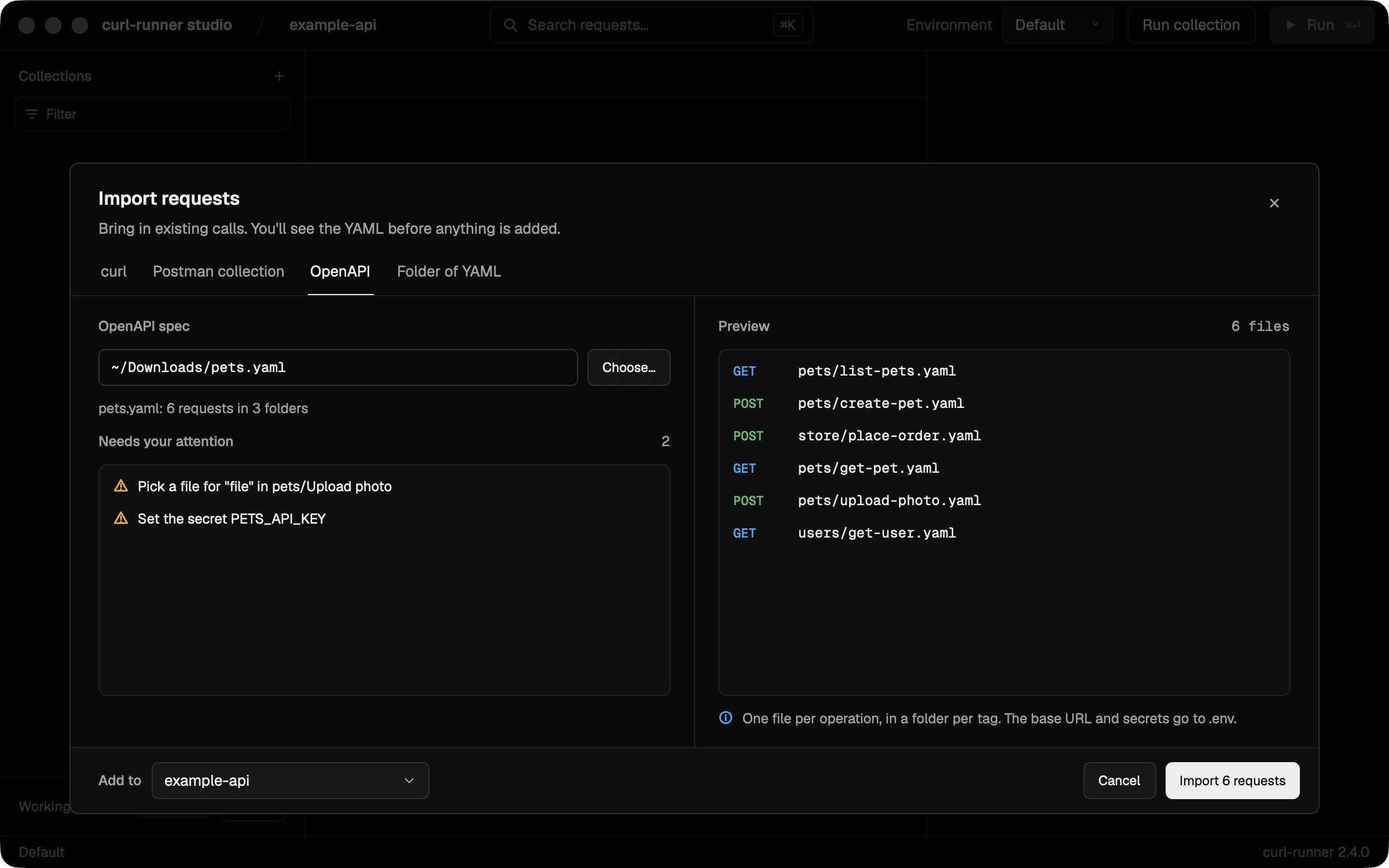
Why OpenAPI
Most APIs already have a spec. It lists every endpoint, what to send and what comes back. That's most of a smoke test, written down in a format nothing can run.
I wanted to take a spec and end up with plain files next to the code. One command, then a folder you can run in CI. OpenAPI 3.0, 3.1 and Swagger 2.0 all work, as JSON or YAML.
From the CLI
convert openapi writes the files and then tells you what it couldn't finish for you:
Converted 6 requests in 3 folders to pets
Needs your attention:
  - Pick a file for "file" in pets/Upload photo
  - Set the secret PETS_API_KEY
Run them from pets so curl-runner loads its .env.
Set the secrets above in pets/.env.local.
A secret left unset is sent as written, like ${PETS_API_KEY}.
You get one file per operation and a folder per tag:
pets/
├── .env
├── README.md
├── pets/
│   ├── create-pet.yaml
│   ├── get-pet.yaml
│   ├── list-pets.yaml
│   └── upload-photo.yaml
├── store/
│   └── place-order.yaml
└── users/
    └── get-user.yaml
Each file reads like one you'd write yourself:
# Imported from OpenAPI: Pets
# operationId: listPets
# Everything about pets.

request:
  name: List pets
  method: GET
  url: ${PETS_BASE_URL}/pets
  headers:
    X-API-Key: ${PETS_API_KEY}
  params:
    # # How many pets to return.
    # limit: "1"
  expect:
    status: 200
A few things to notice:
- The base URL is a variable. It comes from the spec's first server and lives in
.env. Other servers are listed there as comments. - Variables are prefixed with the API's name.
PETS_BASE_URLinstead ofBASE_URL, so two APIs can share one.envwithout sending requests to the wrong host. limitis commented out. It's optional, so it comes in as a comment with its description. Delete the#to switch it on.expect.statusis set. It's the lowest documented 2xx response, so the folder works as a smoke test from the start.
Because it's a CLI command, you can run it in a script or in CI. It never overwrites a file: a name that's taken gets -2.
In the studio
Press ⌘I, open the OpenAPI tab and choose a spec, or drop it on the dialog. You see the files you'll get and what needs your attention before anything is written. A spec dropped on the Postman tab opens the OpenAPI tab.
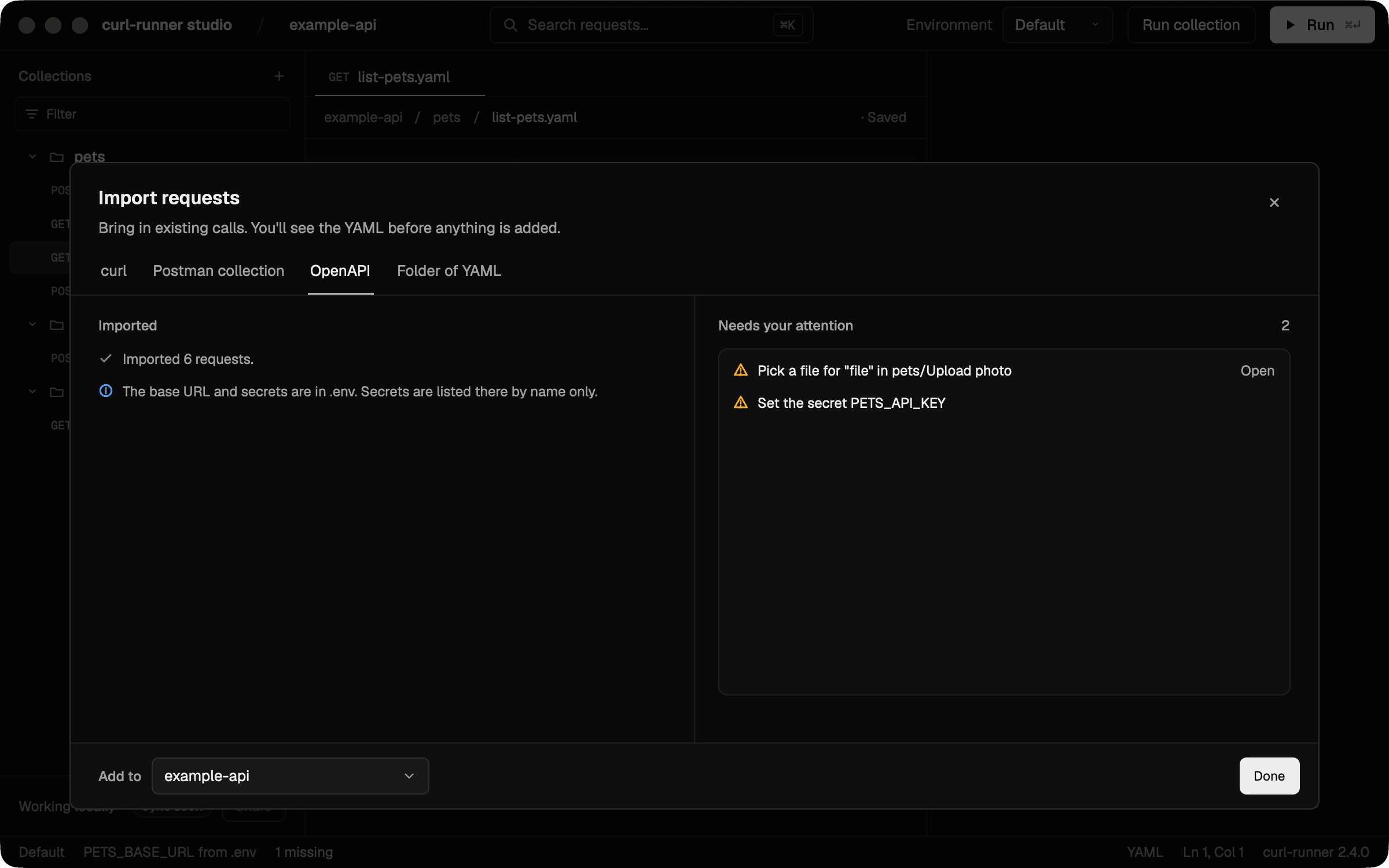
After the import, the dialog keeps a short list of what's left. Open next to a "Pick a file" item takes you straight to that request.
Secrets stay out of your files
The importer never copies a credential from an auth scheme or a secret-named parameter into a file. A key inside a body example is kept as written, so check those.
- In the CLI, each secret goes into
.envby name only, as a comment. You set the value in.env.local, which you keep out of git. - In the studio, you set secret values in Environments, and they go to your macOS Keychain.
- Parameters with secret names, like
token,api_keyorpassword, get a variable too. The Limits section lists what is still kept as written.
Sample values and checks
Every parameter and body gets a sample value. curl-runner uses the spec's example, then the schema's example, default or first enum value, then a generated one. Generated values are fixed, so the same spec always gives the same files. They are a starting point. Change them to records that exist in your API.
Each request gets expect.status set to the lowest documented 2xx status. With no 2xx response in the spec, there is no expect block. Only the status is checked, not the response body.
What's skipped
The report lists what it couldn't convert. A few things are skipped quietly: response body checks, OAuth flows, x- extensions, Accept and Content-Type header parameters, explicitly empty form schemas, styles on optional parameters, and extra tags (an operation is written once, under its first tag). The report lists these:
- External
$refs to another file or a URL. - Webhooks, callbacks and links. They're counted, not converted.
- Auth schemes other than API key, bearer, basic, OAuth 2.0 and OpenID Connect. OAuth flows don't run. You put an access token in the variable.
- Body types such as a binary file. JSON, multipart, form, text and XML bodies come in.
The CLI takes a local file. To import a spec from a URL, download it first with curl -o openapi.json <url>.
The OpenAPI import docs have the full mapping, from auth alternatives to server variables.
Upgrade
If you installed the standalone binary, curl-runner upgrade takes you to 2.5.0. For the studio, download the new dmg or use Homebrew:
brew upgrade --cask curl-runner-studioThe changelog has the rest. If a spec of yours doesn't come out the way you expect, open an issue and tell me what it looked like. I'd love to see the weird ones 🙂