curl-runner 2.4.0 imports Postman collections. Point it at the .json you exported and you get a folder of YAML files you can run, commit and review. It works in the terminal with curl-runner convert postman, and in the studio's Import dialog.
curl-runner upgrade
curl-runner convert postman example-api.postman_collection.json -o example-api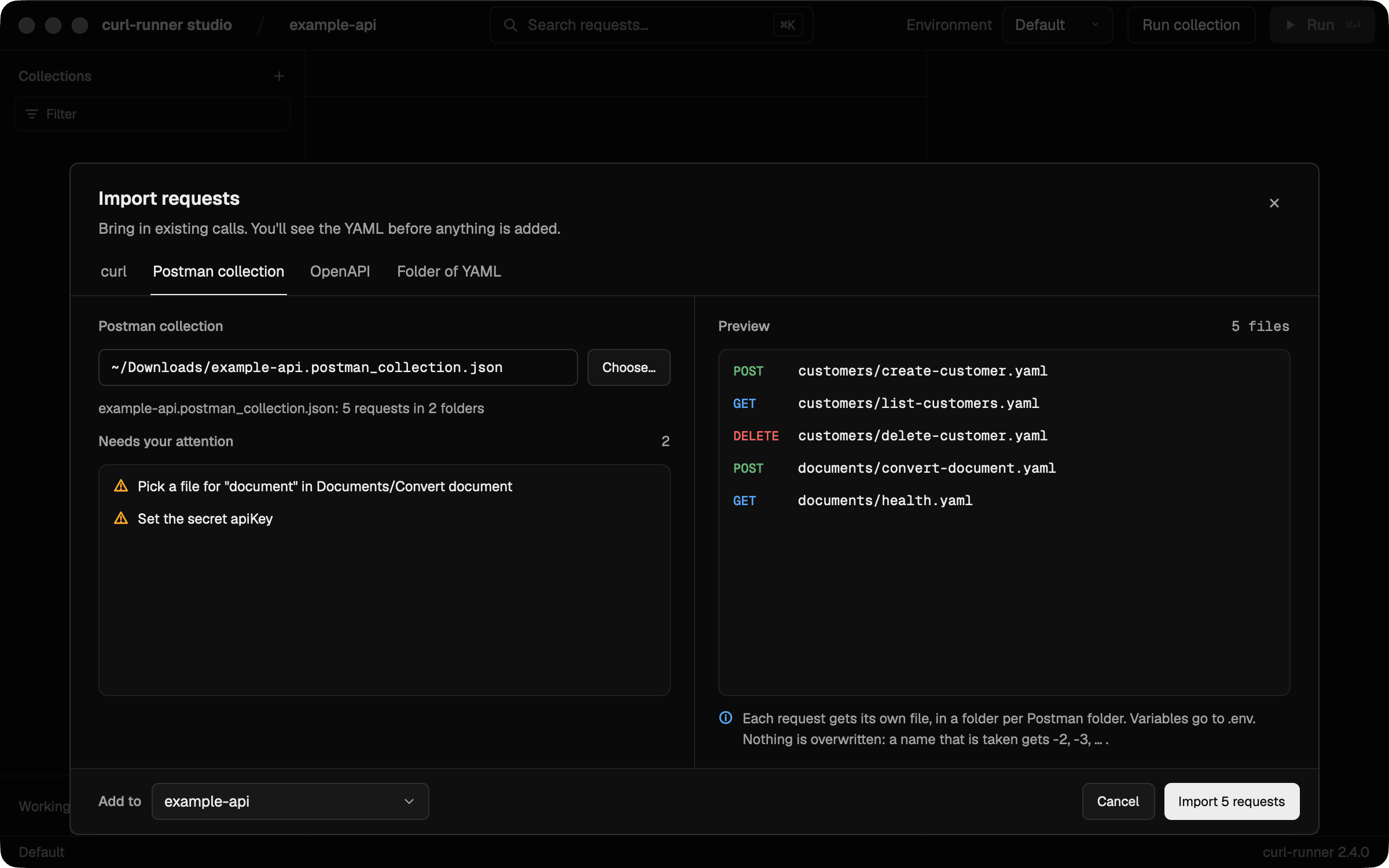
Why Postman
A lot of APIs get shared as a Postman collection. On a project I work on, we hand our REST API to customers that way: a build script generates the collection, and people import it to see every endpoint and what to send.
That's a good way to share an API. It's not a great place to keep your own requests, though. The collection lives in Postman, your tests live in your repo, and the two drift. I wanted to take a collection and end up with plain files next to the code, without rewriting twenty requests by hand.
From the CLI
convert postman writes the files and then tells you what it couldn't finish for you:
Converted 5 requests in 2 folders to example-api
Needs your attention:
  - Pick a file for "document" in Documents/Convert document
  - Set the secret apiKey
  - Set the secret PASSWORD
Run them from example-api so curl-runner loads its .env.
Set the secrets above in example-api/.env.local.
A secret left unset is sent as written, like ${apiKey}.
You get one file per request and a folder per Postman folder:
example-api/
├── .env
├── README.md
├── customers/
│   ├── create-customer.yaml
│   ├── delete-customer.yaml
│   └── list-customers.yaml
└── documents/
    ├── convert-document.yaml
    └── health.yaml
And each request reads like one you'd write yourself:
# Imported from Postman: Example API
# Lists customers, newest first.

request:
  name: List customers
  method: GET
  url: ${baseUrl}/v1/customers
  headers:
    X-Api-Key: ${apiKey}
  params:
    limit: "10"
    # starting_after: cus_1
A few things to notice in that file:
- The description is a comment at the top. That's often where a collection explains what to send, so it comes along.
- The API key header comes from the collection's auth. Postman sets it once for the whole collection, and curl-runner puts it on every request that inherits it. Requests set to "No auth" don't get it.
starting_afteris commented out. It was turned off in Postman. Optional fields come in as comments in the same place, with their descriptions, so you switch one on by deleting the#. I care about this one a lot: generated collections tend to list every optional setting turned off, and dropping them would throw away the "what can I send" part.
Because it's a CLI command, you can run it in a script or in CI. If your build generates a collection, it can regenerate the YAML too. It never overwrites a file: a name that's taken gets -2.
In the studio
Press ⌘I, open the Postman collection tab and choose your file. You see the files you'll get and what needs your attention before anything is written.
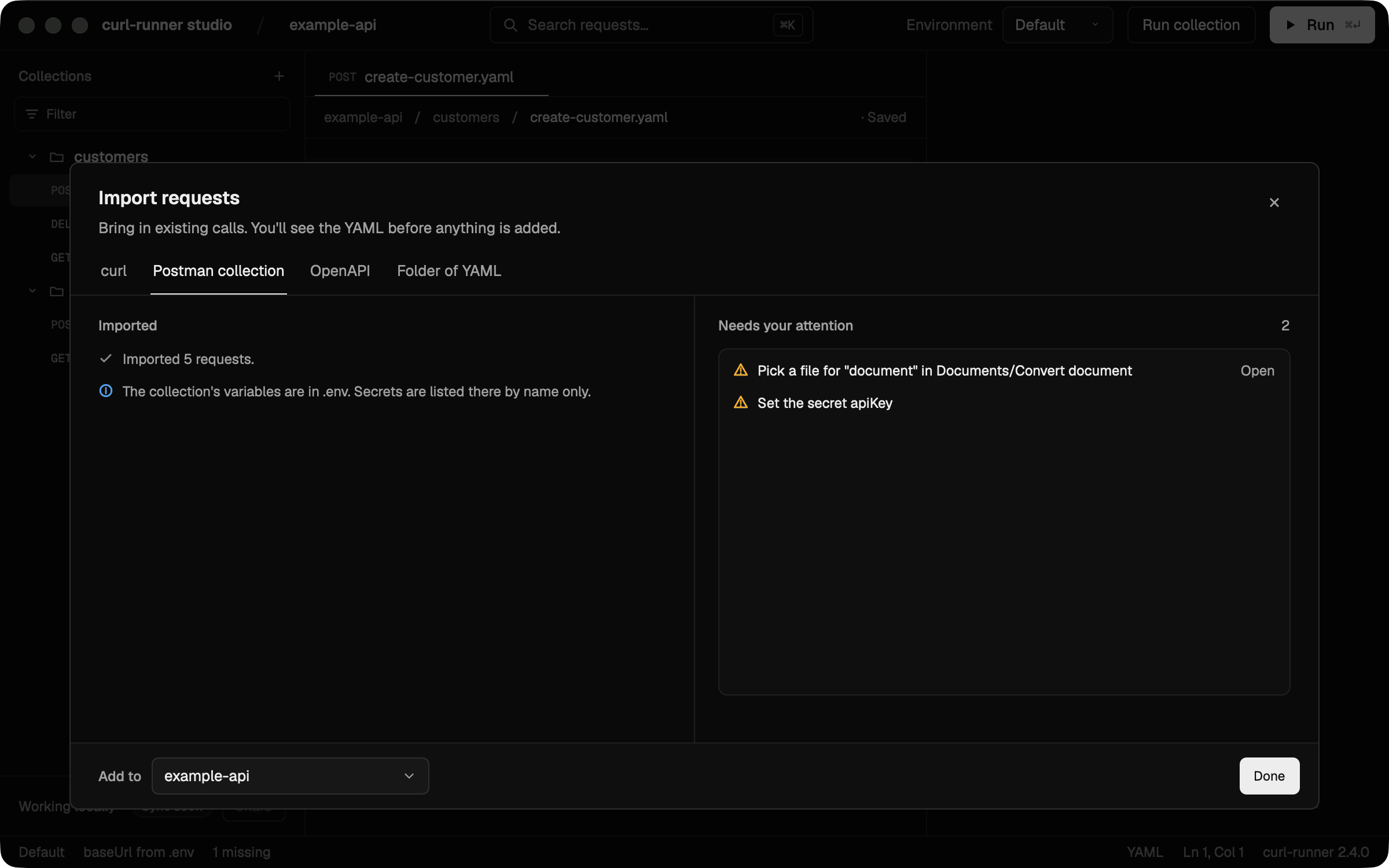
After the import, the dialog keeps a short list of what's left. Open next to a "Pick a file" item takes you straight to that request.
Secrets stay out of your files
This was the part I was most careful with. A collection often carries an API key, and the last thing you want is that key committed in a YAML file.
- In the CLI, secret variables go into
.envby name only, as a comment. You set the value in.env.local, which you keep out of git. - In the studio, secret values go to your macOS Keychain, the same way the curl import already handles them.
- Keys pasted straight into a header or a query param get moved into a variable too, with the same rules as the curl import. So a sloppy collection doesn't leak either.
What isn't converted yet
The importer tells you about everything it skips. Nothing disappears without a line in the report. Today that covers:
- Pre-request and test scripts. They're listed, not translated.
- OAuth 2 and other auth types besides API key, bearer and basic. The request still comes in, without auth.
- Postman environment files. Only the collection's own variables are imported.
- Dynamic variables without a curl-runner match.
{{$guid}}becomes${UUID}, but{{$timestamp}}stays as written, because Postman means seconds and curl-runner means milliseconds.
OpenAPI import is next. The tab is already in the dialog, marked Coming soon.
The Postman import docs have the full mapping, from auth inheritance to path variables.
Upgrade
If you installed the standalone binary, curl-runner upgrade takes you to 2.4.0. For the studio, download the new dmg or use Homebrew.
One heads-up there: Homebrew 7 asks you to trust third-party taps before it loads anything from them. If brew upgrade says the tap is untrusted, trust it once:
brew trust alexvcasillas/tap
brew upgrade --cask curl-runner-studio
The changelog has the rest. If a collection of yours doesn't come out the way you expect, open an issue and tell me what it looked like. I'd love to see the weird ones 🙂